
Best Apex Legends cheats for PC
Best Apex Legends cheats and apex cheats for Windows PC: listed ESP, aimbot, loot, radar, and weekly, monthly, and lifetime plans before you play.
Apex Legends is the live battle royale most people mean when they type the shorter phrase apex legend into a search box. Apex Cheats is the Windows PC product on this site. Searches for apex cheats, apex legends cheats, apex cheat, and apex hacks usually want the same first answer: which modules are actually listed, what they cost, and where to read status before a new season. This page is that map. It does not promise that a build stays compatible after the next client update, and it does not claim undetected use against Easy Anti-Cheat.
Before you buy, read the features page, the store, and the status page. The best habit is to treat screenshots as illustrations until they match the written list. A new character, a new skin, or a map change does not add a cheat module by itself. The PC client is the only platform this listing covers. Console and older mobile clients are outside the product.
Start with information overlays
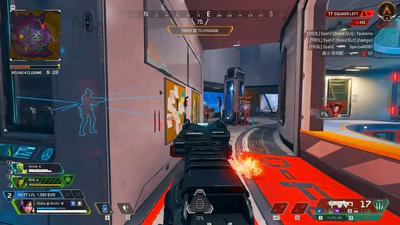
Most buyers arrive looking for Apex Legends ESP: player markers, a health bar, distance, box ESP, and skeleton ESP. Those layers answer who is nearby and how far they are. Loot ESP and radar sit beside them when you want ground items or a compact local cue without filling the screen. On a hot drop, a short range is easier to read than every player and every item on the map. Save a quiet profile before you queue.
Player ESP is the layer people mean by an apex wallhack. Weapon ESP can add the weapon someone is holding. Keep those jobs separate so the HUD stays readable while you play. If the overlay feels noisy, turn distance or skeleton lines off before you add more. The preview shows how layers are presented in the current gallery.
- Player ESP for nearby squads
- Box ESP and skeleton ESP when you need shape
- Health bar and distance ESP
- Weapon ESP for held guns
- Loot ESP and radar as separate layers
Treat aimbot as optional
The advanced aimbot and no recoil are listed combat options. An Apex Legends macro script is not the same thing, and this site does not advertise macros or movement bots. If you only want awareness, leave combat toggles off until ESP is readable. Confirm that split on the FAQ before checkout. Aim modules do not replace game sense, and they do not freeze patch day.
A lifetime plan does not change the habit of checking status. If you are still learning the roster, pair player ESP with the characters guide instead of turning every combat toggle on at once. The goal of a first session is a profile you can read, not a screen full of lines.
Windows PC only
The current listing is the Windows PC client through Steam or the EA App. Do not assume the same access works on an unsupported platform. Use the PC setup guide for the first-run order, including the long shader compile many players hit after an update. Windows 10 or Windows 11 is the documented base.
Cloud DMA and HWID Spoofer are related products with their own prices and checkout links. You do not need either one to buy Apex Cheats. Review Cloud DMA and HWID Spoofer only if you are comparing those listings on purpose.
Plans and price
Apex Cheats lists three USD plans on the store: weekly at $15, monthly at $35, and lifetime at $150. The feature list is the same. Duration is the difference. See plan notes if you are still deciding. Checkout for this product is separate from the related-product buttons.
| Plan | Price | Duration |
|---|---|---|
| Weekly | $15 | P7D |
| Monthly | $35 | P30D |
| Lifetime | $150 | P99Y |
Weekly is a 7-day window to evaluate overlays. Monthly is 30 days. Lifetime is a long access window. None of them freeze compatibility. After a new season, re-check status before you launch. That is also the right moment to read patch notes guidance so you know what the game itself changed.
How this site talks about the game
Respawn Entertainment develops Apex Legends and Electronic Arts publishes it. This website is not affiliated with or endorsed by either company. Easy Anti-Cheat is the published anti-cheat. This site does not claim a bypass, a private relationship with the publisher, or permanent safety. After any client update, treat overlay compatibility as unknown until status says otherwise. The longer anti-cheat explainer is here.
People also search ranks, maps, skins, player count, and release history while they research cheats. Those topics have their own guides: ranks, maps, skins, player count, and release date. Cosmetics do not add aimbot or ESP options.
A conservative first session
Finish checkout, keep the order email, and follow vendor notes for Steam or the EA App. Enable a short-range player ESP profile first. Add radar only if you still want a compact local cue. Add loot labels when you are looting, not during a third party. Leave aimbot off until the information stack is readable. Save the profile so you are not rebuilding it after every launch.
This overview does not promise ranked safety, console support, or a farming bot. If you arrived from a generic cheats search, stay on the listed modules. When you are ready to compare access length, open the store. When you are ready to install, open setup and status. That order keeps Apex Legends cheats research tied to the live listing.
A last pass before checkout
Write down the three pages you will open in order: features, status, then the store. If status is quiet and the feature names match what you expected, choose a duration. If a friend sent a different feature list, ignore the message and stay with the pages on apexcheats.net. That habit matters more than any single toggle, because the listing is the contract and the chat message is not. When you are done comparing, you should be able to name the modules you will enable on day one and the modules you will leave off.