
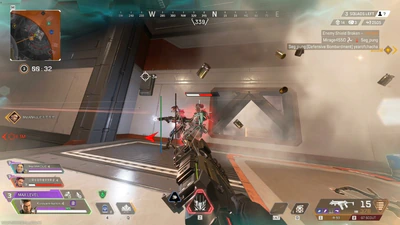
Apex Legends ESP: players, boxes, and health
How Apex Legends ESP, player ESP, box ESP, skeleton ESP, health bars, distance, and weapon labels are described on the listing.
Apex Legends ESP is the family name for information overlays. An apex wallhack search usually means the same idea: seeing player information you would not see through a wall in the normal game. On this listing that idea is split into pieces you can turn on separately: player ESP, box ESP, skeleton ESP, a health bar, distance ESP, and weapon ESP. Loot is covered on its own page because ground items are a different job from squad markers.
None of these labels aim for you. The aimbot guide is the combat side. This page is only about reading the fight. If a menu screenshot shows extra toggles that are not on the features page, trust the written list. Builds change, and a picture can be older than the text.
Player, box, and skeleton
Player ESP is the base marker for another person. Box ESP draws a rectangle so the marker stays obvious when the scene is dark or crowded. Skeleton ESP draws a body line so you can read stance and direction. Use one or two of them, not every line at once, especially in a final circle where the game already draws a lot of effects.
Apex Legends maps have vertical layers, zip lines, and buildings with several floors. A box on a player above you is easier to misread if distance is off. Turn distance ESP on when you are learning a map, then shorten the range once you know the POI. The maps guide explains rotation without pretending ESP replaces ring knowledge.
Health bar and weapon labels
The health bar is there so you can see listed health, and armor context when the build includes it. It does not tell you whether a knock is a good push. A player on low health can still have a teammate on a roof. Weapon ESP adds the gun someone is holding, which matters when a close-range weapon and a long-range weapon ask for different peeks.
Legend identity is not the same as a weapon label. If you need to study the roster, pick rates, or Alter, use the characters guide. ESP can show that a player is there. It does not teach the kit. Skins also do not change the overlay. A skin is cosmetic.
- Player ESP marks people
- Box ESP is the simple outline
- Skeleton ESP shows stance
- Health bar and distance add numbers
- Weapon ESP labels the held gun
How to keep it readable
Start at a short distance on the PC client. Hot drops and late rings are the two times a full-map overlay becomes noise. Save two profiles if the menu allows it: one for looting with loot ESP and one for fighting with player markers only. Re-open the profile after an update, because a patch can reset keys or change what a toggle draws.
Windows PC setup still comes first. If shaders are compiling, or the game is updating, do not judge the overlay in that window. The PC guide covers the long shader load players complain about. Status comes before a live match. Easy Anti-Cheat context is in the anti-cheat notes, and this page does not claim a bypass.
What ESP is not
It is not a radar by itself, though radar is listed separately and often used beside it. It is not a rank booster and it does not change ranking. It is not a tracker for public stats. If you want career stats, a public tracker is a different product from this overlay. It is also not required to be paired with Cloud DMA or an HWID product.
Plans on the store share this feature list: $15 weekly, $35 monthly, and $150 lifetime. Pick a duration on the plans page. Then confirm status the day you play. That sequence is the whole point of reading an ESP guide before checkout.
A readable default
A workable first profile is box ESP, a health bar, and distance under a short cap. Add skeleton ESP only after you can track a fight without it. Add weapon ESP when you are dying to guns you did not identify, not because a settings video turned every box on. Save that profile under a boring name like “loot-off” or “fight-short” so you can return to it after a patch resets your experiments. The preview gallery is a reference for what layers look like, not a challenge to enable all of them.
Test the profile in the firing range or a quiet drop before a ranked queue. Walk behind cover and confirm the marker matches the player who peeks, not a teammate you forgot to filter. If the build offers an enemy-only control, use it. Friendly labels in a three-stack are clutter. Then loot one POI with loot ESP on its own page’s advice, and switch back. Two jobs, two profiles, one saved config you can explain to support if the draw call fails after the next client build.
None of this changes the price or the anti-cheat story. You still pay $15, $35, or $150 for the same list, and you still stop when status says the build is unavailable. ESP is the part of that list most people can evaluate with their eyes. If the boxes do not match the players in front of you, do not “fix” it by enabling aimbot. Fix the information layer first, or wait for a status update. That order prevents a bad read from becoming a worse habit. Repeat the same drop with the quieter profile before you judge the feature, and write down the distance cap that still let you see the ring warning. Save that distance cap in the profile name so a later patch cannot quietly erase the number.